
ChatTCP MCP
ChatTCP MCP lets an AI analyze a PCAP file. Ask in a client such as Cursor or Claude, and the AI calls ChatTCP to read the capture.
Use either Local or Remote. Remote is configured on the MCP page. Local uses port 17380 by default, and you can change that port on the ChatTCP home page.
Local MCP (App)
The PCAP stays on this computer. It is not uploaded. Local MCP analyzes TCP only; UDP captures are not supported.
Download ChatTCP and open the app. The default port is 17380. Click MCP on the left of the home page to see the port and change it to a free port. The panel copies the AI client configuration and shows whether MCP is listening. If the port is already in use, the error is shown there.
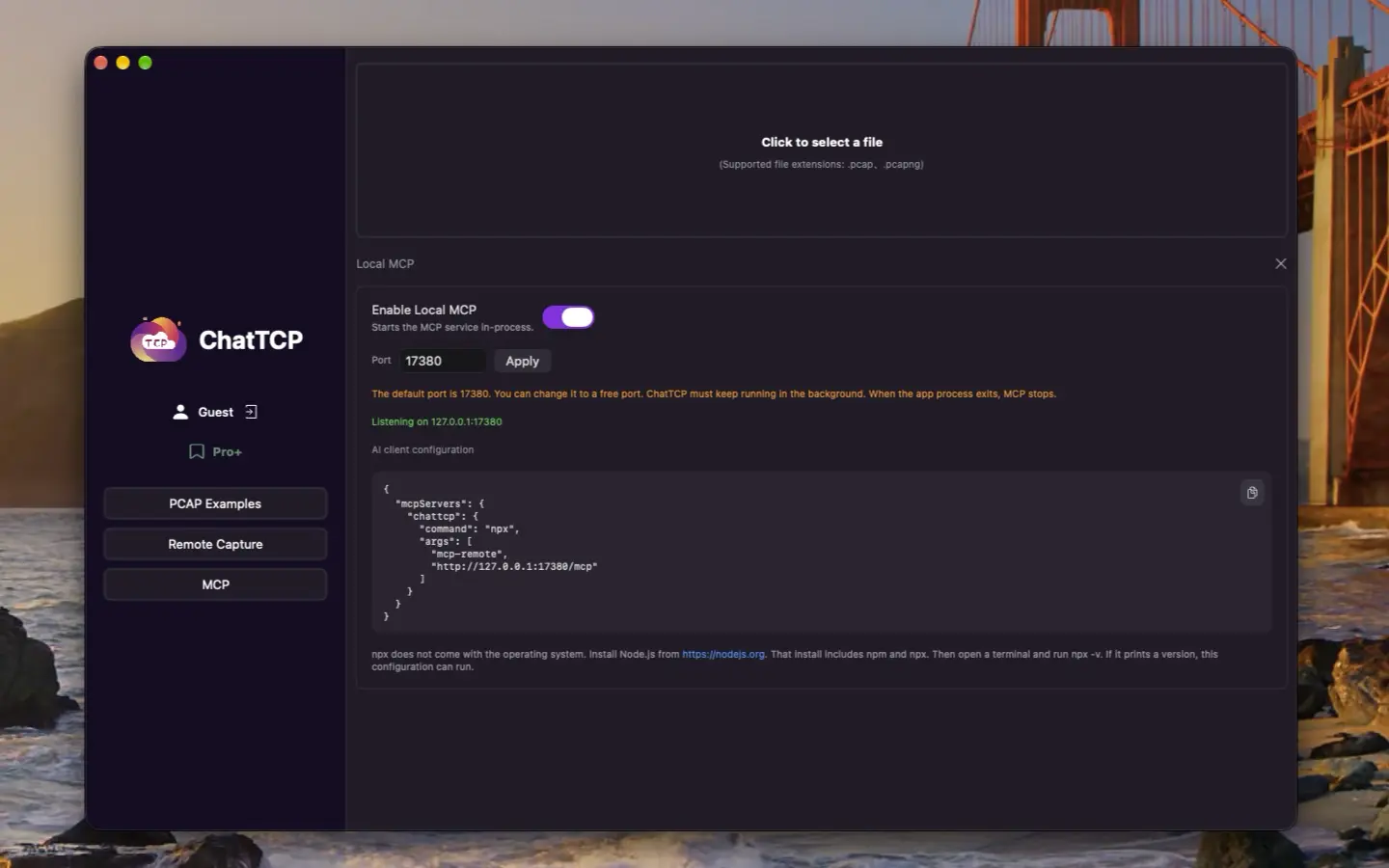
ChatTCP must keep running in the background. When the app process exits, local MCP stops. If you change the port, the configuration must use the same port.
Open Local MCP (App) to copy the configuration for the default port. In Cursor, paste it into ~/.cursor/mcp.json. In another client that supports MCP, add it to that client's MCP configuration.
{
  "mcpServers": {
    "chattcp": {
      "command": "npx",
      "args": [
        "mcp-remote",
        "http://127.0.0.1:17380/mcp"
      ]
    }
  }
}
The
npxcommand in the configuration does not come with the operating system. Install Node.js from https://nodejs.org. That install includes npm and npx. Then runnpx -vin a terminal. If it prints a version, both the local and remote configurations can run.
Then ask with the path of the file on this computer, for example:
Look at /Users/me/a.pcap. Why did the client get no response on connections to server port 8080?
Remote MCP (Website)
The PCAP is uploaded to the ChatTCP server and analyzed there. You do not install the app.
Open Remote MCP (Website), sign in, and generate an API key. The key is shown only once, so save it. Copy the configuration, replace your-api-key with your key, and paste it into the client's MCP configuration.
{
  "mcpServers": {
    "chattcp": {
      "command": "npx",
      "args": [
        "mcp-remote",
        "https://mcp.chattcp.com/mcp",
        "--header",
        "X-API-Key: your-api-key"
      ]
    }
  }
}
The
npxcommand in the configuration does not come with the operating system. Install Node.js from https://nodejs.org. That install includes npm and npx. Then runnpx -vin a terminal. If it prints a version, both the local and remote configurations can run.
Then ask directly, for example:
Analyze this PCAP and tell me why the HTTP response body is empty.
The AI uploads the file to the ChatTCP server and then answers.
Which one to use
Use Local MCP when the file must stay on this computer. Install ChatTCP and keep the app open.
Use Remote MCP when you do not want to install the app. The file is uploaded to the ChatTCP server.